Dressmaker Troubleshooting
Last updated . Dressmaker is a fan-made guide and is not affiliated with the developers.
Dressmaker is a small, well-behaved game, so when something breaks it is usually Steam, a driver, macOS Gatekeeper or your network. The paid Steam release and the free itch.io prototype are different builds, so a fix for one may not apply to the other. The dressmaker game home page covers the difference.
1. Dressmaker will not start on Windows
You press Play, the button says running, and nothing appears.
Verify the game files
Right-click Dressmaker in Steam, then Properties → Installed Files → Verify integrity of game files. Steam replaces anything that does not match the 1.19 GiB Windows depot.
Update GPU drivers
Get the driver from Intel, AMD or NVIDIA directly, not Windows Update. The game needs DirectX 11 and Intel UHD 630 graphics or better, but a stale driver can still block it.
Run as administrator
Right-click Dressmaker → Manage → Browse local files, then set the executable to run as administrator under Properties → Compatibility. That also rules out a blocked save folder.
Confirm Windows 10 or later
Windows 10 or later is the published minimum; Settings → System → About shows your build. Older versions are not supported.
Check antivirus quarantine
Look in your protection history for anything matching the game folder. Restore it, exclude your Steam library, then verify the files again.
The publicbeta branch
SteamDB lists a publicbeta branch described as "Experimental and untested changes". If the developers have published one, opt in under Properties → Betas, but only as a last resort: a beta branch is less stable and can hand you a new crash.
2. Stuttering or a low frame rate
Dressmaker is not demanding; hitching on a machine that meets the specs comes from outside it.
Close background apps
Browsers full of tabs, launchers, capture tools and overlays fight for the same GPU. Close them and turn off the Steam overlay.
Update drivers, go windowed
Fresh drivers matter more than raw power. If it is still rough, go windowed and drop one resolution step; the game still looks fine.
Check the minimum specs
The published minimum is an Intel Core i5 or AMD Ryzen, 8 GB of RAM, Intel UHD 630 graphics or better and 1 GB of storage; on Mac, an Apple M1. No recommended tier is published. Full list: Dressmaker system requirements.
Laptop thermal throttling
A laptop that plays well for ten minutes then crawls is hot, not underpowered. Use a hard surface, clear the vents and set Windows power mode to performance.
3. macOS says the prototype may be malicious
The itch.io prototype is not notarized, because there is no Apple developer account behind it, so macOS refuses to open it and calls the developer unverified.
The official workaround
macOS shows that button only after it has blocked the app once, so try opening the game first.
- Open System Settings, then Privacy & Security.
- Scroll down to the security section and click Open Anyway.
- Confirm in the second prompt that appears.
On Steam this does not happen
The Steam release is a normal Steam install for Apple Silicon, with a published minimum of Apple M1. If it will not open, verify the files in Steam first.
4. The itch.io download will not unzip
Match the file name and size
| File | Platform | Size (version 0.5.5) |
|---|---|---|
| Dressmaker Prototype Windows 0.5.5.zip | Windows | 115 MB |
| Dressmaker Prototype Linux 0.5.5.zip | Linux | 127 MB |
| Dressmaker Prototype OSX 0.5.5.zip | macOS | 128 MB |
If your download is much smaller than the size listed, it stopped early. Download it again.
Use a real unzip tool
Windows Explorer and the macOS Archive Utility open these files, but they fail most often on a big download. Try 7-Zip or The Unarchiver instead.
Free space and slow downloads
Unzipping needs that much space again, so clear a couple of gigabytes first. A crawling download is itch.io, your region or your ISP, not the game.
5. itch.io will not load at all
If the itch.io page itself never opens, the problem is the connection, not the build.
Another browser, another network
Open the page in a second browser, then in a private window with extensions off. If neither helps, try a phone hotspot.
VPNs, DNS and networks
A VPN can make itch.io unreachable, so turn it off. School, office and hotel networks block game sites outright. The Dressmaker demo page has the direct link.
6. Saves, progress and Steam Cloud
Cloud saving is listed, but check it yourself
Steam Cloud appears in the game's Steam feature list, so your progress should follow your account between machines. The developers have not published what exactly is synced, so if a dress matters to you, back the folder up before reinstalling anything.
Find your save folder
Steam shows where the game lives: right-click Dressmaker in your Library, then Manage → Browse local files, and look for a saves folder inside or beside it. Steam also keeps per-game data under userdata, your account ID, then App ID 4019220.
7. You cut the wrong fabric
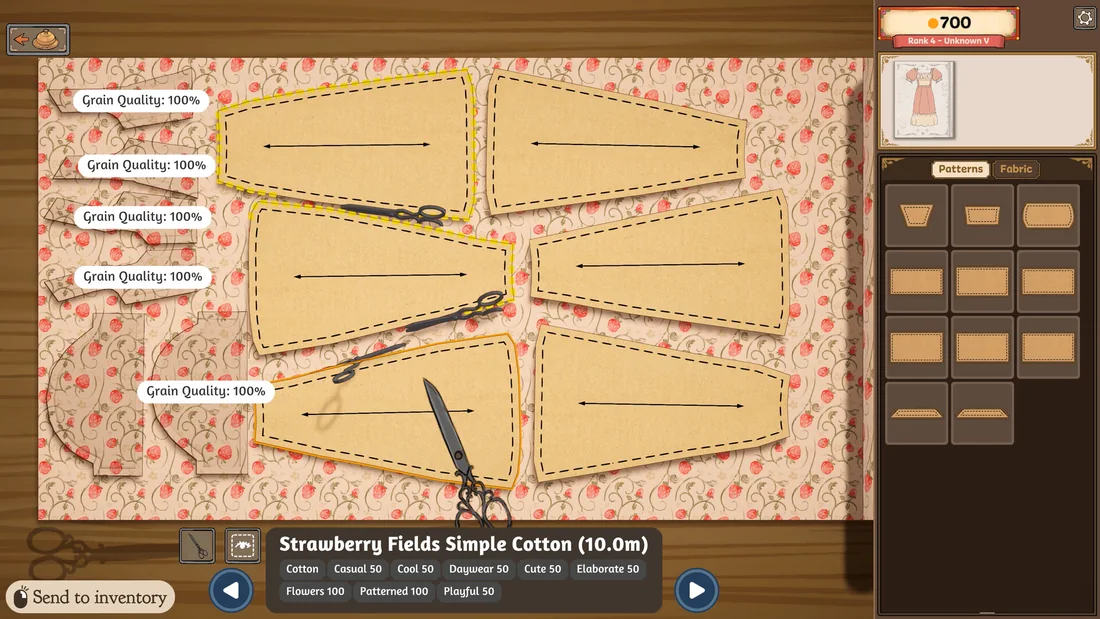
Cutting is permanent by design
There is no undo, and no way to lift a pattern piece off the cloth once the shears have gone through it. How you cut your fabric is what appears on the finished dress.
Practice on cheap fabric
Practice on the cheapest cotton you can find before you spend anything on velvet. The mannequin preview is free, so check every panel first. More on the Dressmaker sewing tips page.
8. Where to report a real bug
If the game crashes, or a commission breaks in a way no unlucky cut explains, report it: the Dressmaker Steam discussions or the developers' Discord (invite on the itch.io page).
What to include
- Your build: the Steam branch, or the prototype file name.
- Platform, OS version and graphics card.
- Steps that reproduce it.
- What you expected and what happened.
- A screenshot or a short clip.
- Your save file, if progress is involved.
When to report it
Work down this ladder and stop as soon as the problem is solved:
- Restart Steam and verify the game files.
- Update your OS and graphics driver.
- Work through the matching section above.
- Check the Dressmaker patch notes for a hotfix.
- Report it on the Steam discussions or the Discord.
- Still stuck? Tell us.
Frequently asked questions
Does Dressmaker support Steam Cloud?
Yes, Steam Cloud is listed among the game's Steam features. The developers have not published which files sync, so treat it as a safety net rather than a backup and keep your own copy of anything you would hate to lose.
Can I undo a cut in Dressmaker?
No. Cutting is irreversible by design and there is no undo. Practice on cheap cotton and check the mannequin preview before every cut.
Why does macOS say the prototype may be malicious?
Because the itch.io prototype is not notarized, so macOS cannot verify the developer. The official fix is System Settings, Privacy & Security, then Open Anyway.
Where do I report a Dressmaker bug?
In the official Steam discussions or the developers' Discord, with your build, platform, exact steps and a screenshot.
Why will my antivirus not let Dressmaker run?
Heuristic scanners sometimes quarantine files from small studios. Check your protection history, restore anything belonging to the game and exclude your Steam library.